
An AI employee is the hottest job title in software right now, and almost every page explaining it is written by a company that wants to rent you one. That isn’t a crime. It just means you’re getting the definition from the shop counter.
I’m coming at it from the other side. I don’t sell an AI employee platform. I run about twenty of them. They’re Claude Code agents on a cron schedule inside Docker on one VPS, and they run this site. In the 30 days from September 17 to October 16 they were dispatched 405 times. 351 of those runs ended in a reported success and 25 in a deliberate skip. One failed outright. The other 28 are the interesting part, and I’ll show you every bucket below.
Here’s the deal. You’ll get a definition that holds up, a test you can run on any product calling itself an AI employee, my real roster with receipts, the jobs I’d never hand over, prices read off the vendor pages on October 18, 2026, and a plan for hiring your first one this month.
What Is an AI Employee? The One-Paragraph Definition

Here’s the definition I’d defend in front of a skeptical accountant:
An AI employee is software that owns a recurring job. It starts the work itself on a schedule or a trigger, carries what it learned from last time, writes down what it did, hands anything above its pay grade to a human, and gets reviewed by someone who actually reads its output.
Notice what’s missing from that definition: a model name, a chat window, a cute avatar. An AI employee is a job description, not a product. The same underlying model can be a chatbot in one setup and an employee in another. What changes is everything wrapped around it.
That’s why the term confuses people. Vendors use “AI employee” for at least three different things:
- A named persona on a platform. “Eva handles your inbox, Rachel takes calls.” Marblism, Sintra and similar tools sell pre-built roles under a subscription.
- A configurable agent builder. Lindy and its peers give you the parts (triggers, tools, memory, credits) and you assemble the role.
- A custom build. An agency or an operator like me builds a role around your exact tools and hands you the keys.
All three can pass the definition above, and all three can fail it. A beautifully branded “AI sales rep” that only answers when you open its chat window isn’t an employee. It’s a very polite search box.
Why the word “employee” is doing a lot of work
The word is borrowed for a reason: it implies responsibility. Employees show up without being asked, remember yesterday, and tell you when something’s wrong. Software has historically done none of those things. If a tool really does them, the label is fair. If it doesn’t, the label is marketing. Keep that framing handy, because it’s the whole test in Section 3.
AI Employee vs Chatbot vs AI Agent vs Virtual Assistant

These four get blended together constantly. Here’s how I separate them, by who starts the work and who carries the responsibility:
| Who starts the work? | Remembers last time? | Owns an outcome? | Typical cost | |
|---|---|---|---|---|
| Chatbot | You, every time | Within one conversation | No | Free to ~$20/mo |
| AI agent | You, or a trigger | Sometimes | One task | Usage-based |
| AI employee | Its schedule or trigger | Yes, by design | A recurring job | Subscription or build + running cost |
| Virtual assistant (human) | Their schedule | Yes | Yes, with judgment | Hourly or monthly retainer |
The honest summary: an AI employee is an AI agent that has been given a job, a calendar and a supervisor. The agent is the engine. The employee is the engine plus the paperwork.
Where the virtual assistant comparison breaks
Most small business owners asking about AI employees are really asking “can this replace my VA?” Sometimes, partly. An AI employee beats a VA on consistency, hours and cost per task. A VA beats it on judgment, on handling the weird email, and on noticing that a client sounds upset. I went through the swap task by task in replacing a virtual assistant with AI, including which jobs transfer cleanly and which ones you’ll want a human for anyway.
And if you’re still fuzzy on the agent side, my plain-English guide to a fully autonomous AI agent covers what “autonomous” really means in production, warts included.
The AI Employee Job Description Test: 5 Things It Needs
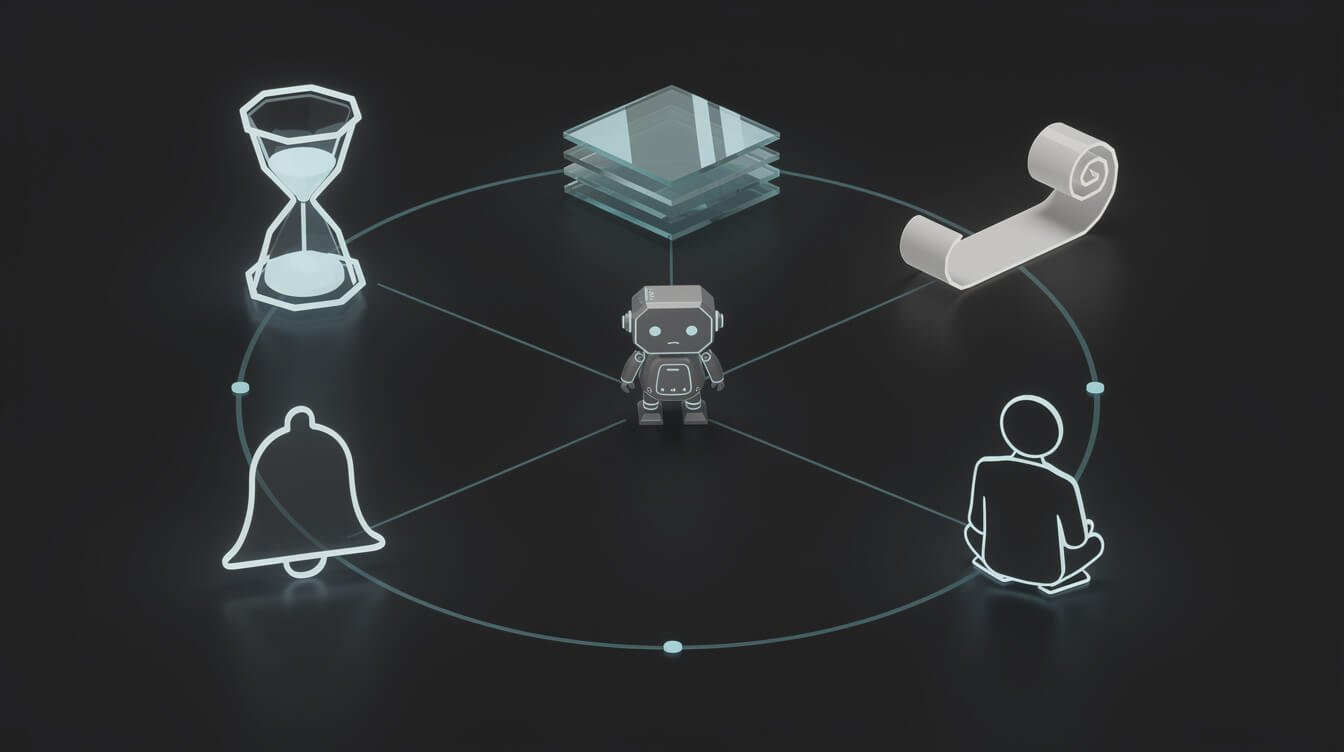
Before you pay for anything with “AI employee” on the box, run it through these five questions. If a product can’t answer yes to all five, it’s a tool you’ll be operating, not a hire who works for you.
1. A schedule (does it start work on its own?)
A real AI employee clocks in without you. Mine are dispatched by a cron scheduler at fixed times: the blog writer at 00:07, the email checker at 11:07 and 21:07, the watchdog at 23:37. Nobody presses a button. If the product only works when you open it, it fails here.
2. A memory (does it know what happened yesterday?)
Each of my agents reads a shared memory file before it starts and writes what it learned when it finishes. That file is plain text. It’s now 2.08 MB, up from 0.70 MB in mid-September, and there isn’t a vector database anywhere in the stack. I explained the pattern in give your agent a memory (it’s just a text file). Without memory, you have a talented temp who starts from zero every morning.
3. A log (can you see what it did?)
Every run writes a log file and ends with one line in a fixed format: success, skip or fail, plus a summary. There are about 1,700 of those dated logs on the server since June 12. If you can’t audit an AI employee’s work after the fact, you can’t trust it with anything you’d mind losing.
4. An escalation path (does it know when to stop?)
The most important skill an AI employee has is knowing which jobs aren’t its job. Mine hand those off as tasks in Asana with the context attached. More on what gets escalated in Section 5.
5. A manager (does anyone read the output?)
This is the one buyers skip. A daily watchdog agent checks that every scheduled slot ran and reported. Then I read the summary. An AI employee without a manager isn’t autonomous, it’s unsupervised, and those are very different words. The instruction file that runs my unattended businesses is basically the job description and the employee handbook in one document.

Get the AI Playbook
The operator notes behind my fleet: which jobs run unattended, what they cost, and what broke this week. Free, and you can leave whenever you like.
My AI Employee Roster: What 20 of Them Did in 30 Days

Here’s the part competitors skip: numbers. Every figure below was counted from the run logs on the server on October 18, 2026, for the window September 17 to October 16.
The roster
There are 20 active roles. Eleven work every day and nine work once or twice a week. Three more roles (a B2B outreach team) exist but are switched off until the content side has more history. That matters: a good AI employee can be furloughed without anyone filing a grievance.
- Content: blog writer (nightly), daily contribution writer, newsletter researcher and writer (weekly).
- Social: two social posters, a social researcher, a Reddit miner and a reply drafter.
- Inbox and admin: email checker (twice a day), Asana task checker, subscriber sync.
- Growth: keyword researcher, content researcher, market intelligence, Search Console and analytics sweep, and three link-outreach roles.
- Management: the nightly watchdog.
The timesheet
| Outcome (Sep 17 to Oct 16) | Runs |
|---|---|
| Reported success | 351 |
| Reported a deliberate skip (nothing to do) | 25 |
| Finished cleanly but didn’t file the result line | 25 |
| Never finished (one expired login, two cut off mid-run) | 3 |
| Reported a failure | 1 |
| Total dispatches | 405 |
Two things jump out. First, skips are a feature. The Asana checker reported “nothing to do” 17 times out of 30, and that’s exactly right. An employee who invents work to look busy is worse than useless. Second, the 25 runs that finished without filing their result line are the AI equivalent of doing the job and forgetting the timesheet. The work usually got done, but a manager can’t tell that at a glance, which is why the watchdog exists.
The inbox receipt
The email checker is the role most people want first, so here’s its month. Across 59 runs it sorted 519 emails: 0 customer, 16 partnership, 58 finance and 445 miscellaneous. It drafted 5 replies and sent none on its own. Finance emails never get a reply, they become a task for me. That’s what a sensible new hire does in their first month: sort everything, draft a little, and ask before touching money.

⚡ GET THE AI EDGE
Weekly AI tips that actually save you time and money. No fluff, no hype — just what works.
The honest misses
Not every role earns its keep. Two of the twenty draft replies for Reddit threads and hand them to a human to post, and the human (me) hasn’t posted them. I wrote up how many AI agents a small business actually needs with that failure front and centre. The lesson: an AI employee whose output lands on an absent human’s desk is a fully paid role producing nothing.
If you’d rather have a roster like this built around your own business than assemble it yourself, that’s what I do. Book an automation strategy session and we’ll work out which of your weekly jobs are ready to become roles.
What I’d Never Let an AI Employee Do

Every AI employee in my fleet has the same short list of things it is not allowed to decide. These aren’t theoretical. They’re written into the instruction file every agent reads at the start of every run.
Touch money or make commitments
No pricing decisions, no agreements, no promises on my behalf. Finance emails get categorised and turned into a high-priority task for me, never answered. If an AI employee can agree to a discount, sooner or later it will agree to a bad one.
Make public decisions that are really policy
Here’s a real one. My social posting agent noticed that our scheduling tool was quietly marking its AI-made images as “not AI-generated” on Instagram. The fix is one setting. It didn’t flip it. It filed a card for me, because how a brand labels AI content in public is a policy decision, not a task. That’s exactly the behaviour you want: notice, explain, escalate, wait.
Invent data to fill a gap
One rule in every job description here is “never invent data, if a queue is empty, skip.” That’s why 25 runs ended in a deliberate skip. The cost of an AI employee making something up to avoid an empty report is much higher than the cost of an empty report.
Handle the conversation that needs a human
Upset customers, partnership negotiations, anything with legal weight. The AI employee drafts, a human decides. My AI receptionist cost breakdown goes into where that handoff should sit for phone calls specifically.
For what it’s worth, the time I spend managing this crew is mostly not about content. In how much time AI agent maintenance takes, 17 out of 17 jobs that needed me were expired keys and logins, not bad writing.
What an AI Employee Costs: Rent, Build, or Keep the VA

There are three ways to get an AI employee, and the price tags look very different. Every vendor price below was read off the vendor’s own pricing page on October 18, 2026. I haven’t run a month on these platforms, so treat them as published list prices, not lived bills.
| Option | Published price | What you’re actually buying |
|---|---|---|
| Marblism (pre-built roles) | $24/mo billed yearly, $44 billed monthly | 7 named roles, “50h of work” included, unlimited team members |
| Sintra (pre-built helpers) | $97/mo list for all 12 helpers (shown at $48.50 in a sale banner), or $39/mo per single helper | 250 monthly credits for advanced actions, top-ups extra |
| Lindy (agent builder) | $50 free credits for 7 days, then from $49.99 per user per month | 5,000 credits a month per seat, top-ups at $10 per 1,000, credits don’t roll over |
| Custom build | One-time build plus model and tooling costs | Roles built around your tools, which you own |
Watch the metering. Every platform above limits how much work the fee buys, whether it’s called hours, credits or helpers. Lindy says that when the pool runs out, it pauses until your credits reset. That’s a fair design, but it means your AI employee can go on unpaid leave mid-month. Price the workload, not the headline. I covered the builder end of the market in my Lindy AI agent review.
What my build costs to run
The Claude plan behind my fleet is $200 a month (September’s invoice was $206.92 with tax). Images cost about $0.08 each and a short video about $0.33. I published the full breakdown in the build-vs-hire guide. What that number leaves out is the operator: someone has to write the job descriptions, fix the keys and read the logs. That person is the real cost of an AI employee, whichever option you pick.
When to keep the VA
Keep the human if the job is mostly judgment, relationships or exceptions. Swap to an AI employee if the job is mostly the same steps on a schedule. Most real VA roles are a mix, which is why the best answer is often “AI employee does the repeatable 70%, the VA does the rest and manages the AI.” That’s a promotion for your VA, not a firing.
How to Hire Your First AI Employee This Month

Treat it like a real hire. It sounds cute. It’s actually the most reliable method I know.
- Write the job description first. One recurring job, one sentence. “Every weekday at 9am, sort the inbox into four labels and draft replies to partnership emails.” If you can’t write that sentence, you don’t have a role yet.
- Define what it must never do. Money, commitments, public policy, anything legal. Write it down before day one.
- Give it a place to remember. A notes file, a database row, a shared doc. Anything it reads first and writes last.
- Require a timesheet. Every run ends with success, skip or fail plus one line of summary. No timesheet, no trust.
- Run a two-week probation in draft mode. It does the work, you approve it. Count how often you change its output. When that number gets boring, widen its permissions.
- Assign a manager. Either you read the summary daily, or a second agent checks that every run happened and tells you when one didn’t.
If you want the no-code route for step one, my no-code AI agent guide for solopreneurs walks through the platform options. Back in June I wrote a short piece on treating your AI agents like employees, not search engines. Four months and twenty roles later, I’d still stand by it.
AI Employee FAQ
What is an AI employee in simple terms?
Software that owns a recurring job. It starts on its own, remembers past runs, logs what it did, escalates what it shouldn’t decide and gets reviewed by a human.
Is an AI employee the same as an AI agent?
Not quite. An AI agent is the engine that can take actions. An AI employee is an agent with a defined job, a schedule, memory and a supervisor. Every AI employee is an agent. Most agents aren’t employees.
How much does an AI employee cost?
On October 18, 2026, published platform prices started around $24 a month (Marblism, billed yearly) and Lindy started at $49.99 per user per month. All of them meter the work. Custom builds cost more upfront, and the bigger ongoing cost is whoever manages the roles.
Can an AI employee replace a human employee?
It can replace parts of a job, usually the repeatable, scheduled parts. It can’t replace judgment, relationships or accountability. In my experience it changes what the human does more than whether you need one.
What’s the best first job for an AI employee?
Something recurring, low-risk and easy to check. Inbox sorting, weekly reports, content research, and data entry between two tools are all good candidates. Avoid anything that touches money or customers directly until it has passed probation.
What happens when an AI employee makes a mistake?
The same thing that happens with a person: you find it in the log, correct the instructions, and it doesn’t make that one again. This is why the log and the memory file matter more than the model.
Final Thoughts: Hire for the Job, Not the Avatar
Strip away the avatars and the clever names, and an AI employee comes down to five boring things: a schedule, a memory, a log, an escalation path and a manager. If a product gives you all five, the “employee” label is earned. If it doesn’t, you’re buying a tool and you’ll be the one doing the clocking in.
My roster isn’t perfect. Twenty-five runs forgot their timesheet last month, one failed outright, and two roles hand their work to a desk nobody sits at. But 351 reported successes in thirty days, a full inbox sorted without a single unauthorized reply, and an agent that knew to stop at a policy decision and ask me first is exactly what I’d want from a human hire too.
Start with one job. Write it down. Give it a timesheet. Then read the timesheet.
Hiring Your First AI Employee?
Get the AI Playbook: the job descriptions, costs and failure notes from a real roster of AI employees, written for solo operators. No fluff, no filler.

📥 FREE: THE AI PLAYBOOK
The exact tools and workflows I use to run a one-person agency. 25 years of marketing experience distilled into an actionable guide. Yours free.

AI & Digital Marketing Strategist
With over 25 years in digital marketing, e-commerce, sales, and international business, Jon Jones is a seasoned entrepreneur dedicated to empowering small businesses through innovative AI solutions. His journey began in investment banking on Wall Street, guiding companies through capital acquisition and complex markets, and has expanded to include expertise in web development, brand design, product development, and courses and training.
Fluent in Mandarin and with a rich foundation in both finance and tech, Jon launched JonJones.ai to provide accessible, transformative tools for small businesses to streamline operations, generate leads, and build sustainable growth. His mastery of AI, automation, and digital strategy has enabled numerous businesses to bridge the gap between traditional practices and modern technology, ensuring they thrive in today’s digital landscape.