You’ve seen “MCP server” pop up everywhere lately — in Claude tutorials, in n8n setup guides, in developer threads that mysteriously land in your feed. But nobody’s explained the mcp server meaning in actual plain English. Not for someone running a business. Not for the solopreneur who just wants to know: does this apply to me?
Short answer: yes. Massively.
Here’s what an MCP server actually is, why Anthropic built the protocol, and how you can start using MCP servers in your own automation stack today — no developer background required.
What Is an MCP Server? (The Plain-English Definition)
MCP stands for Model Context Protocol — an open standard created by Anthropic in November 2024. Think of it as a universal adapter for AI. Just like USB-C standardized how your devices connect to power and data, MCP standardizes how AI connects to your tools, data, and services.
An MCP server is the component that sits between your AI and a specific external tool. It speaks the MCP language on one side, and the tool’s native API on the other. It’s the translator that makes your AI actually capable of doing things — not just talking about them.
Every MCP server exposes three types of capabilities to the AI:
- Tools — actions the AI can take (push code to GitHub, send a Slack message, query a database)
- Resources — data the AI can read (files on your computer, records from an API, pages in Notion)
- Prompts — reusable templates the AI can invoke for consistent workflows
Before MCP existed, every AI model needed custom, one-off code to connect to every external tool. GitHub wanted to connect to Claude? Someone had to write Claude-specific GitHub integration code. OpenAI wanted the same? Different code, different maintenance burden. The ecosystem was a mess of incompatible proprietary integrations.
MCP solved that. Now any AI that speaks MCP can connect to any MCP server. Build once, connect everywhere. That’s the mcp server meaning at its core: a universal bridge that makes AI agents genuinely useful in the real world.
MCP is already supported by Anthropic (Claude), Google DeepMind, Microsoft (Copilot), and hundreds of third-party tool builders. It’s not an Anthropic-only play — it’s becoming the internet standard for AI-tool connectivity.
How MCP Servers Actually Work — Without the Dev Jargon

Here’s the architecture, simplified:
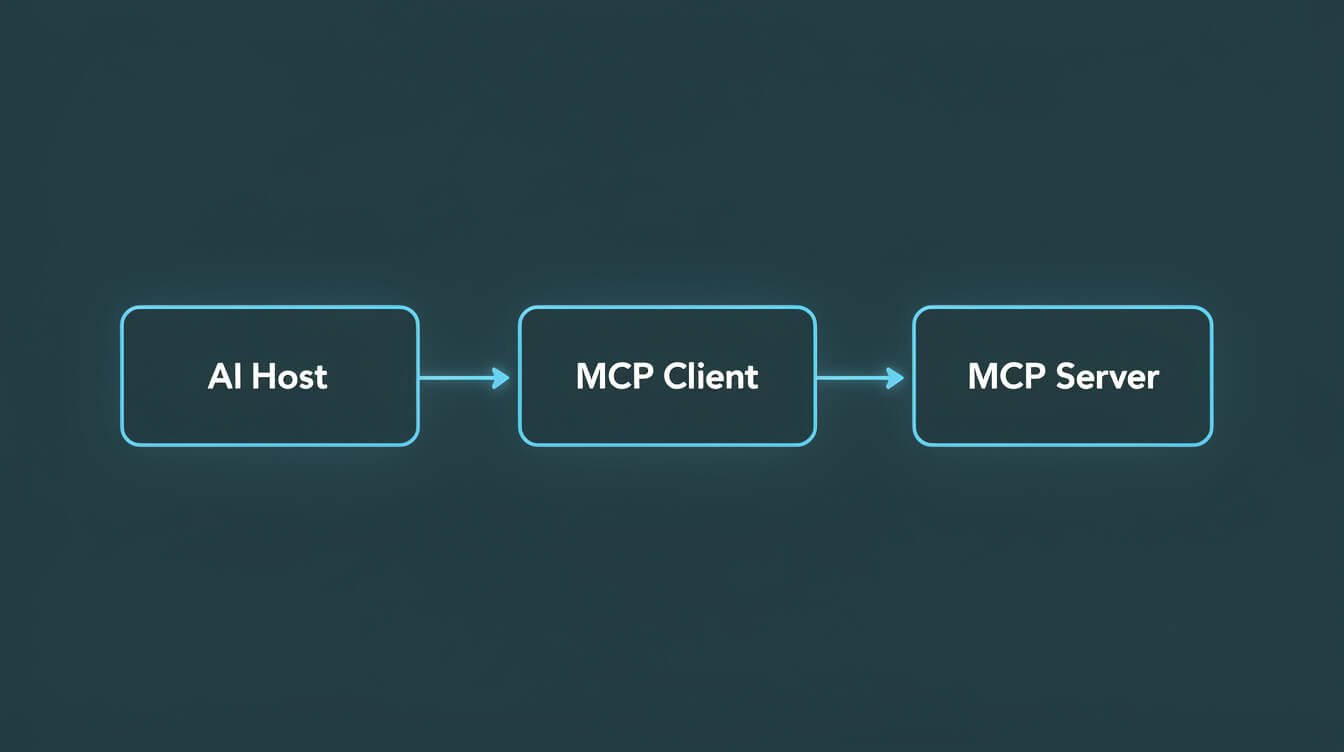
Layer 1: The MCP Host — This is the AI interface you interact with. Claude Desktop, Claude.ai, Claude Code, or your own custom application. The host contains the AI model and manages your conversation.
Layer 2: The MCP Client — Lives inside the host. Its only job: manage connections to MCP servers. When you ask the AI to “check my GitHub PRs,” the client routes that request to the right server.
Layer 3: The MCP Server — The bridge to your actual tool. It receives the request from the client, translates it into the tool’s native API call, gets the result, and sends it back in MCP format. Each server handles one specific tool or service.
Here’s how a real interaction flows:
- You ask Claude: “What pull requests need my review?”
- Claude recognizes this needs GitHub data
- The MCP client sends the request to the GitHub MCP server
- The GitHub MCP server calls GitHub’s API with your credentials
- Results come back through the server → client → Claude
- Claude gives you a clear answer about your open PRs
The whole thing happens in seconds. From your perspective, you just asked Claude a question and it answered — but under the hood, it just queried a live external system.
There are two types of MCP servers you’ll encounter:
- Local servers — Run on your own machine. Great for accessing your local filesystem, running scripts, or connecting to local databases. Faster, more private, no cloud dependency.
- Remote servers — Hosted in the cloud. Better for services that are already cloud-based (Slack, GitHub, Notion). Can be accessed from anywhere without local setup.
For most solopreneurs, you’ll use a mix of both. Local servers for your files and scripts, remote servers for the SaaS tools your business runs on.
Why MCP Server Meaning Matters for Your Business Right Now
Let me be direct about why this matters beyond the technical explanation.
Before MCP, AI assistants were essentially very smart search engines with good writing skills. You could ask them questions and get answers based on their training data. That training data had a cutoff date. It couldn’t see your actual files. It couldn’t take actions in your actual tools. It was a really impressive parrot.
With MCP, the game changes completely. Your AI can now:
- Read your actual business data — not what it knows about businesses in general, but YOUR Airtable records, YOUR Google Drive files, YOUR database tables
- Take real actions — not just tell you what to do, but actually do it: push code, send messages, update records, create tasks, schedule meetings
- Work across your entire stack — one AI agent connected to all your tools via MCP servers, instead of ten different AI integrations for ten different tools
The competitive implication is significant. Operators who understand how to wire up MCP servers get AI that operates on their real world. Everyone else gets AI that talks about the real world. That gap compounds every week.
Think about the agentic AI shift that’s already happening — autonomous systems making decisions and taking actions without constant human input. MCP is the infrastructure layer that makes that possible. Without it, agents are chatbots with good personalities. With it, they’re actual operators.

Get the Free AI Playbook
Practical frameworks for wiring AI into your business — MCP servers, agent stacks, and the automation moves that actually compound. Free, no-fluff, operator-grade.
The Best MCP Servers for Solopreneurs in 2026
The MCP server ecosystem has exploded since Anthropic open-sourced the protocol. Here are the ones that actually matter if you’re running a one-person or small-team operation:
GitHub MCP Server
The most powerful one for builders. Gives Claude real access to your repositories — it can read code, create branches, open pull requests, write comments on issues, and manage releases. I wrote a complete hands-on guide to setting up the GitHub MCP Server if you want to start there. If you write any code or manage any tech projects, this is your first install.
Filesystem MCP Server
Gives AI read and write access to specified directories on your computer. I use this constantly — my agents read project files, update configuration, write reports to disk. Completely local, zero cloud dependency. Ships with Claude Desktop by default.
Brave Search MCP Server
Gives Claude real-time web search capability. Instead of relying on training data, Claude queries live search results. Crucial for research tasks, competitor analysis, and any question that has a “current state” answer.
PostgreSQL / SQLite MCP Servers
Direct database access. Your AI can run queries, analyze your data, and help you build reports — without you having to copy-paste data into a chat window. For solopreneurs tracking anything in a database, this is transformative.

⚡ GET THE AI EDGE
Weekly AI tips that actually save you time and money. No fluff, no hype — just what works.
Slack MCP Server
Read channel history, send messages, search conversations. Useful if you’re managing a community or team communication. Also pairs well with automated alert systems — your agent detects something and sends a Slack message automatically.
Notion MCP Server
Read and write Notion pages, databases, and blocks. Great for solopreneurs who use Notion as their operating system — your AI can update project pages, add meeting notes, create new database entries without you switching context.
Puppeteer / Browser MCP Server
Launches a real browser, navigates pages, clicks buttons, fills forms. The nuclear option for web automation — useful for sites that don’t have APIs and can’t be scraped conventionally.
The official directory lives at modelcontextprotocol.io/servers with hundreds of community-built servers. If a tool you use doesn’t have an MCP server yet, chances are someone’s building one.
How I Use MCP Servers in My JonOps Stack (Real Receipts)

JonOps runs 10+ autonomous brand containers. Every one of them uses Claude Code as the agent runtime, and Claude Code is MCP-native out of the box. Here’s exactly how MCP servers show up in my real production stack:
Filesystem MCP: The Foundation of Everything
Every container has a project directory. My agents read skill files, configuration, memory files, and log their output — all via the filesystem MCP server. When my blog-writer agent runs at midnight, it reads the skill instructions from disk, reads the keyword queue, writes drafts — all without any human involvement. The filesystem MCP is the invisible plumbing under all of it.
GitHub MCP: Code Review Without the Context Switch
When I’m building new skills or debugging agent behavior, I use Claude Code with GitHub MCP active. I can ask it to review the diff of a recent commit, explain what changed, identify potential issues, and suggest fixes — while seeing the actual repository state, not some approximation. It’s the difference between a code reviewer who read a description of your PR versus one who actually opened the files.
Custom Integrations via the Claude Agent SDK
The Claude Agent SDK lets you build custom MCP servers that wrap your own APIs and business logic. In JonOps, I have custom tools that wrap WordPress REST, Airtable, Metricool, and Asana — all exposed as MCP-compatible tools that my agents can call natively. The agents don’t need special code to call WordPress; they just call the publish_post tool and the MCP server handles the API authentication, error handling, and response parsing.
The compounding effect: every new tool I wire up as an MCP server becomes available to ALL my agents across ALL containers. Write the server once, use it everywhere. That’s the operational leverage MCP creates.
How to Connect Your First MCP Server (No Dev Required)
The fastest path to your first MCP connection: Claude Desktop. Free download, no code, minimal setup. Here’s how:
Step 1: Install Claude Desktop
Download from claude.ai/download. Available for Mac and Windows. This is your MCP host — the environment where Claude will run with server support.
Step 2: Pick Your First Server
For most solopreneurs, start with either:
- Filesystem — for accessing your local files (already bundled with Claude Desktop)
- GitHub — if you work with code or manage a GitHub repository
- Brave Search — if you want real-time web search in every conversation
Step 3: Edit Your Config File
Claude Desktop reads its MCP server config from a JSON file. On Mac: ~/Library/Application Support/Claude/claude_desktop_config.json. On Windows: %APPDATA%\Claude\claude_desktop_config.json.
Open it and add your server. For the Filesystem server (pre-installed example):
{
  "mcpServers": {
    "filesystem": {
      "command": "npx",
      "args": ["-y", "@modelcontextprotocol/server-filesystem", "/path/to/your/folder"]
    }
  }
}
Step 4: Restart Claude Desktop
Close and reopen the app. You’ll see a hammer icon in the input area indicating MCP tools are active. Click it to see which servers are connected and what tools they expose.
Step 5: Test It
Ask Claude to do something that uses your server. “List the files in my Documents folder.” “Show me my open GitHub PRs.” “Search the web for the latest news about MCP servers.” If it works, you’re live.
For a hands-on tutorial with the GitHub MCP server specifically — including authentication setup and real example prompts — check my complete GitHub MCP Server guide.
Frequently Asked Questions About MCP Servers
Is MCP only for Claude?
No. MCP is an open standard published by Anthropic, but it’s designed for any AI system to implement. Google, Microsoft, and dozens of third-party tool builders have already adopted it. Any AI that implements the MCP client spec can connect to any MCP server — regardless of which company built the AI.
Do I need to know how to code to use MCP servers?
For many pre-built servers, no. Claude Desktop makes setup as simple as editing a JSON config file. The Filesystem, Brave Search, and several other servers install with a single command (no npm experience required — the install scripts handle it). Custom servers do require code, but pre-built community servers cover the majority of popular tools.
Are MCP servers safe?
MCP servers run in isolated processes. Each server only has access to the specific resources it’s configured to reach — if you give your filesystem server access to /projects, it can’t touch /personal-photos. That said, you should still only install servers from trusted sources and review what permissions they request, the same way you’d treat any application on your computer.
Is there a cost to use MCP servers?
The MCP protocol itself is open source and free. Pre-built servers are mostly free (maintained by Anthropic, the community, or tool vendors). The tools they connect to have their own cost structures — GitHub MCP server is free, but GitHub itself has usage tiers. The only guaranteed cost is the Claude API/plan you’re already paying for.
What’s the difference between MCP and ChatGPT plugins?
ChatGPT plugins were proprietary, OpenAI-only, and shut down in April 2024. MCP is open, cross-model, and actively growing. MCP is also more capable — it supports bidirectional communication, resource access, and multi-step tool use in ways the plugin system never did. There’s no real comparison; MCP is a fundamentally different architecture.
What’s the difference between MCP and function calling?
Function calling is a model-level feature where you define specific functions an AI can call. It works, but it’s proprietary to each model provider — you define different schemas for Claude vs GPT vs Gemini. MCP sits one layer above: it’s a universal interface standard so you define tools once and any MCP-compatible AI can use them. Think of function calling as a private API versus MCP as a public standard API.
Final Thoughts: MCP Servers Are the Missing Layer
Here’s the honest bottom line: every AI tool you’ve used before MCP was fundamentally limited by its inability to interact with your actual world. It could tell you things. It couldn’t do things. Not reliably. Not at scale. Not in a way that compounds over time.
MCP changes that. The mcp server meaning — at its most practical — is this: a standardized way to give AI real hands. The ability to touch your tools, read your data, take actions in your systems, and return results in a conversation. That’s it. That’s the unlock.
The solopreneurs and operators who internalize this early — who build their stacks around MCP-connected agents — are going to be in a completely different league in 18 months. Not because they’re smarter, but because their AI is actually doing work while everyone else is still copy-pasting chat responses into their tools.
If you haven’t already, start with the GitHub MCP Server guide for a concrete first install, or go deeper on autonomous agent architecture in my complete guide to autonomous AI agents. The infrastructure is here. Time to wire it up.
Build Your AI Stack, Faster
Get the AI Playbook — real frameworks for MCP servers, agent stacks, and the automation moves that compound over time. No hype. Operator-grade. Free.

📥 FREE: THE AI PLAYBOOK
The exact tools and workflows I use to run a one-person agency. 25 years of marketing experience distilled into an actionable guide. Yours free.

AI & Digital Marketing Strategist
With over 25 years in digital marketing, e-commerce, sales, and international business, Jon Jones is a seasoned entrepreneur dedicated to empowering small businesses through innovative AI solutions. His journey began in investment banking on Wall Street, guiding companies through capital acquisition and complex markets, and has expanded to include expertise in web development, brand design, product development, and courses and training.
Fluent in Mandarin and with a rich foundation in both finance and tech, Jon launched JonJones.ai to provide accessible, transformative tools for small businesses to streamline operations, generate leads, and build sustainable growth. His mastery of AI, automation, and digital strategy has enabled numerous businesses to bridge the gap between traditional practices and modern technology, ensuring they thrive in today’s digital landscape.