
Search “AI agent examples” and you get two useless answers. The first is an academic zoo — thermostats, Roomba vacuums, Mars rovers, and self-driving cars filed under “types of agents.” The second is a Fortune-500 highlight reel — Uber’s financial-data agent, Dropbox’s knowledge worker, Salesforce’s text-to-SQL system. Both are technically correct. Neither helps you. You can’t copy a Mars rover, and you don’t have Uber’s data team.
So here are the AI agent examples nobody publishes: nine small, real agents that a one-person business can build and actually run — not in a lab, not with a 12-person engineering team, but this month, on a $5 server. I know they work because I run every single one of them. This brand — the blog post you’re reading right now — is written and published by one of them. Let’s get specific.
What Counts as an AI Agent (a 30-Second Definition)

Before the examples land, you need one clean definition, because the word “agent” has been stretched to mean everything from a chatbot to a spreadsheet macro. Here’s the version I use, and it holds up: an AI agent is a language model in a loop, with tools, memory, and a trigger — allowed to take actions on its own.
Break that into its four moving parts and every example below snaps into focus:
- A brain — a large language model (Claude, GPT, whatever) that reads a situation and decides what to do next.
- Tools — the ability to actually do things: call an API, send an email, write a file, publish a post. A brain with no tools is just a chatbot.
- Memory — somewhere to keep state between runs: a file, a database, an Airtable base. Without memory it forgets everything the moment it stops.
- A trigger — the thing that wakes it up without you: a cron schedule, a webhook, an incoming email.
That’s it. A chatbot answers when you talk to it. An agent wakes up on its own, decides, acts, and goes back to sleep. If you want the longer treatment, I wrote a full primer on what autonomous AI agents are and how they work — but that one-sentence definition is enough to make sense of the nine examples coming up.
9 Real AI Agent Examples a Solopreneur Can Actually Build

Every example here is an agent I run in production across a fleet of autonomous brands. For each one I’ll tell you what it does, what it replaces, and roughly how hard it is to build — because “AI agent examples” should come with receipts, not a Fortune-500 case study you’ll never reproduce.
1. The content-writer agent (the one that wrote this)
What it does: picks a target keyword from a queue, researches the live search results, writes a 2,500–3,000 word SEO article, generates its own images, and publishes it to WordPress — with the SEO metadata set. What it replaces: a freelance blogger at $150–$400 a post. Build difficulty: medium. This post is the receipt: no human wrote it, and no human approved it before it went live.
2. The email triage-and-draft agent
What it does: reads new email, sorts it into categories (customer, partnership, finance, noise), and drafts a reply in my voice using a persona file — then leaves it for a one-click approve. What it replaces: the first 30 minutes of every morning, or a part-time inbox VA. Build difficulty: medium. The trick that makes it safe is draft-mode-first: it never sends on its own.
3. The social miner + engager
What it does: scans target communities for conversations where my experience is genuinely useful, drafts a helpful (non-spammy) reply, and queues it for review. What it replaces: a social-listening tool plus the VA who’d normally monitor threads. Build difficulty: medium-to-hard, mostly because “helpful, not spammy” is a real prompt-engineering problem.
4. The image-generation pipeline
What it does: takes a text prompt, generates an on-brand image, compresses it, and uploads it to the media library — every image in this post came through it. What it replaces: a stock-photo subscription and light design work. Build difficulty: easy-to-medium. It’s the best first “agent” for a lot of people because the output is instantly visible.
5. The market-intelligence scanner
What it does: checks competitors on a schedule, pulls keyword and ranking data, notices when a rival goes quiet or a term spikes, and writes a short briefing to memory. What it replaces: a few hours of manual competitive research a week. Build difficulty: medium. Mine caught all four of my competitors quietly deleting their blogs — a gift I’d never have spotted by hand.
6. The SEO keyword + brief researcher
What it does: finds low-difficulty keywords with real search volume, validates the gap against the live results, and writes a content brief the content-writer agent can execute. What it replaces: an SEO contractor. Build difficulty: medium. This is the agent that fed the brief for the post you’re reading.
7. The newsletter drafter
What it does: turns the week’s published content into a newsletter draft, matched to voice and formatted for the email platform. What it replaces: an email copywriter. Build difficulty: easy-to-medium, because it’s mostly repackaging content that already exists.
8. The lead-outreach agent
What it does: researches a defined target profile, finds fits, and drafts personalized first-touch outreach — again, drafted for approval, never blasted. What it replaces: a prospecting SDR or an outreach VA. Build difficulty: hard, because personalization-at-quality is the whole game and the failure mode (spam) is expensive.
9. The overnight admin-and-triage agent
What it does: runs while I sleep — reconciling records, flagging anything odd, filing high-priority items as tasks, and leaving a short summary for the morning. What it replaces: the boring hour of daily admin that quietly eats a solo operator. Build difficulty: medium. If you want a curated shortlist of platforms to build agents like these on, I keep one in my guide to the best AI agent for small business.
Line those nine up and notice what you’re actually looking at: a writer, an assistant, a social manager, a designer, a researcher, an SEO, a copywriter, an SDR, and a bookkeeper. That’s a small agency’s worth of roles — the exact team a growing solo business normally can’t afford to hire. None of these examples is impressive on its own; a Fortune-500 engineer would shrug at any single one. The impressive part is that one person runs all nine at once, they hand work to each other, and the whole fleet costs less per month than a single freelancer’s invoice. That’s the shift the enterprise lists never show you: agents aren’t just clever, they’re cheap enough to stack.
The Pattern Behind All 9 (Brain + Tools + Memory + Trigger)
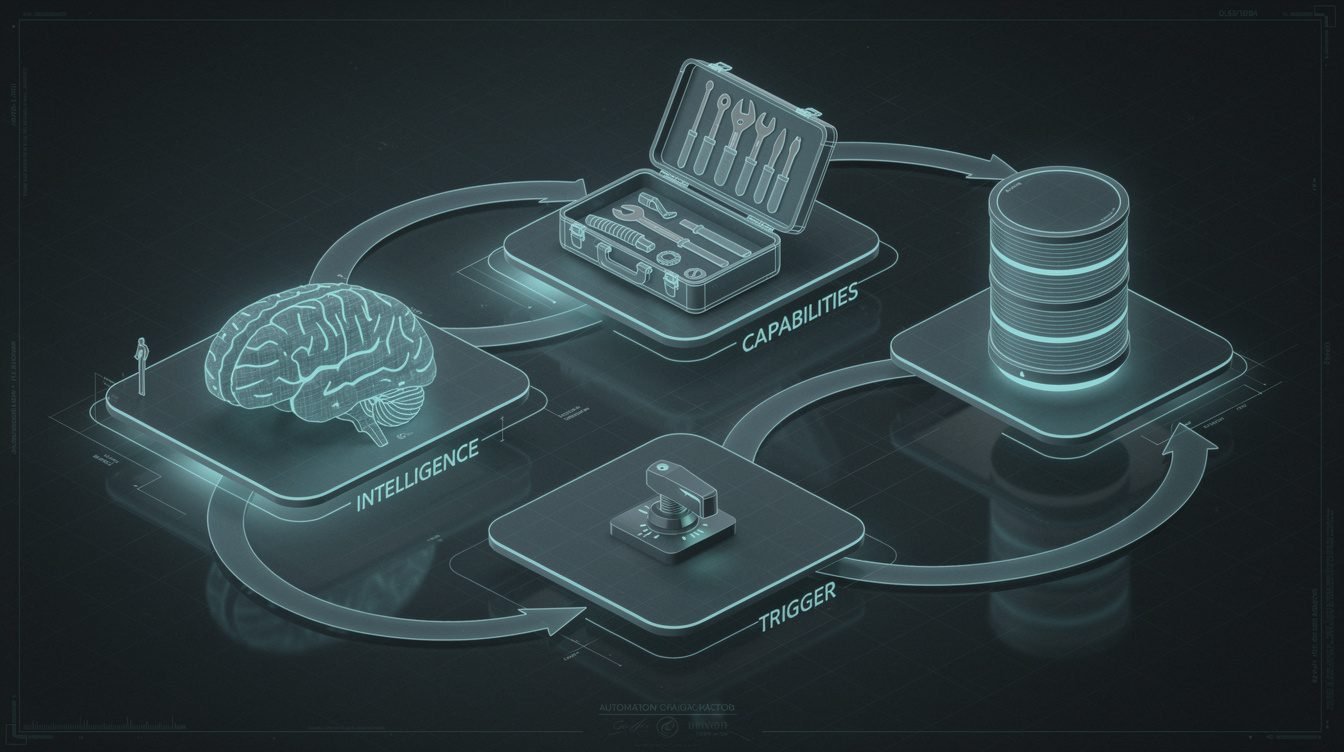
Here’s the part the enterprise listicles bury: those nine agents are not nine different technologies. They are one pattern, wearing nine outfits. Every one of them is the same four parts from the definition, wired slightly differently.
- Brain: the same language model does the deciding in all nine. You don’t need a different model per agent.
- Tools: only the tools change. The content agent gets WordPress. The email agent gets your inbox. The image agent gets an image API. Swap the tools, get a new agent.
- Memory: a file or a database row. My whole fleet remembers what it did yesterday through plain text files and an Airtable base — not a fancy vector store.
- Trigger: almost always a cron schedule. “Run at midnight, do your job, go back to sleep.” A few are webhook-triggered (email arrives → wake up).
Once you’ve internalized this, “how do I build an agent that does X?” stops being a mystery and becomes a fill-in-the-blank: which brain, which tools, what memory, what trigger. You can build the second agent in a fraction of the time the first one took, because you’re reusing the same skeleton. That’s why running ten is barely harder than running one.

Steal My AI Playbook
The exact patterns behind the agents in this post — the brain-tools-memory-trigger blueprint, in a free download. Get it and build your first one this week.

⚡ GET THE AI EDGE
Weekly AI tips that actually save you time and money. No fluff, no hype — just what works.
Which One to Build First (The Highest-ROI Starter Agent)

Do not start with the most impressive agent. Start with the one that touches something you already do every single day, and where a mistake is cheap. For most solo operators, that’s the email triage-and-draft agent or the image-generation pipeline.
Why those two? The email agent attacks a daily pain (your inbox), and if you build it draft-mode-first, the worst-case failure is “it wrote a draft you delete” — zero downside. The image pipeline gives you a visible win in an afternoon, which matters more than it sounds: your first working agent needs to feel like magic so you actually build the second one.
The agent to avoid first is anything that sends messages to strangers unsupervised (like cold outreach) or touches money. Those have real blast radius. Earn the reps on low-stakes, high-frequency work, then graduate. If you’d rather not code the first one, that’s completely valid — start with a no-code AI agent on a visual builder and move to code only when you hit the ceiling.
Here’s a concrete week-one plan if you want one. Day one: pick the single task you did the most times last week that a competent assistant could have handled. Day two: write down exactly what a good outcome looks like — the inputs, the decision, the output — because that description is your agent’s job spec. Day three to five: wire up the brain, give it the one tool it needs, point it at a memory file, and run it manually a dozen times in draft-mode. If its drafts are consistently good, add the trigger and let it run on a schedule. You now have one working agent and, more importantly, the template for the next eight.
This is also the exact fork where a lot of people stall — they can see the nine examples but can’t tell which one is worth their weekend. If that’s you and you’d rather not guess, this is literally what I do for clients: I map your week, find the one agent that buys back the most time first, and we build it. You can book an automation strategy session and we’ll pick your first agent together.
What These AI Agents Cost to Run (Honest Numbers)
The enterprise case studies never tell you the price, because the answer would embarrass them. For a solo operator, the real numbers are almost suspiciously small. Here’s my actual cost structure for running a fleet of these agents:
- Hosting: ~$5/month. One small VPS runs the schedule and the workflow engine for an entire fleet. Not per agent — total.
- Model tokens: tens of dollars a month, scaling with how much the agents actually write. A content agent that publishes daily is the biggest line item, and it’s still cheaper than a single freelance post.
- Point tools: an image API bills fractions of a cent to a few cents per image; most other APIs (search data, email) are cheap or free at solo volume.
Add it up and a working agent that replaces hundreds of dollars of monthly freelance or VA work costs you the price of a couple of coffees to run. The expensive resource isn’t compute — it’s the time to build and the discipline to add guardrails. I break the platform economics down further in my honest look at open source AI agents, but the headline holds: this is a rounding error, not a budget line.
Where One-Operator Agents Break (and the Guardrails That Save You)

I’d be lying if I said these run flawlessly. They break — and the whole difference between a useful fleet and a liability is knowing how they break and boxing it in. Here are the four failure modes I’ve actually hit, and the guardrails I never skip:
They act confidently on wrong information
An LLM will happily write something false in a fluent, professional tone. Guardrail: ground it in real data (research the live sources, read the actual record) and keep anything customer-facing in draft-mode until you trust it.
They do something dumb with untrusted input
If an agent reads an email or a web page and treats the text as instructions, a stranger can hijack it. Guardrail: read-only scopes wherever possible, and a human approval step on anything that leaves your system — emails, posts, outreach.
They fail silently
The worst agent failure isn’t a crash — it’s the one that quietly does nothing for a week while you assume it’s working. Guardrail: every agent logs what it did and pings me (a one-line Telegram alert) on every run, success or fail. No news is not good news.
They hit a limit and stall
Rate limits, an expired token, an API that changed. Guardrail: fail loudly, retry sensibly, and design each agent to skip gracefully rather than corrupt data when its inputs aren’t there. If you want the deeper build-level view of this, my write-up on the Claude Agent SDK covers how I wire permissions and logging into every agent from day one.
Frequently Asked Questions About AI Agent Examples
Are these AI agents hard to build?
The first one is the hardest, and it’s medium — a focused weekend if you’re comfortable with a bit of scripting, longer if you start on a no-code builder. Every agent after that is dramatically easier because they all share the same brain-tools-memory-trigger skeleton. You’re not learning a new thing nine times; you’re swapping tools onto a pattern you already know.
Do I need to know how to code?
For the simplest examples — image generation, a basic drafting agent — no; a visual no-code builder gets you there. For the load-bearing ones that run unattended and touch multiple systems, some scripting ability (or a developer, or me) makes them far more reliable. Coding isn’t a prerequisite to start; it’s what raises the ceiling.
Are these agents safe to run unattended?
The read-only and draft-mode ones? Absolutely — that’s the point. Anything that sends messages, publishes, or touches money should earn its autonomy gradually: start it in draft-mode, watch its first dozen runs, and only remove the human step once it’s boring. Unattended is a destination, not a starting setting.
What’s the single best first agent to build?
A draft-mode email triage agent or an image pipeline. Both hit daily-frequency work, both have a near-zero cost of failure, and both give you a working agent fast — which is the momentum you need to build the rest. For more one-operator inspiration, my roundup of AI-powered content creation tools shows how several of these agents chain into a single publishing pipeline.
Final Thoughts
The reason the internet’s “AI agent examples” are either thermostats or Uber is that almost nobody occupies the middle — the small, real, one-operator agents that quietly replace the work you’re drowning in. That middle is exactly where the leverage is for a solopreneur. Nine agents, one repeated pattern, five dollars of hosting, and a discipline of guardrails: that’s not a lab demo, that’s a business that runs while you sleep.
You don’t have to build all nine. You have to build one — the right one — and let the momentum carry you. If you want a shortcut past the trial and error, I build these for operators every week. Book an automation strategy session and we’ll find the single agent that buys back the most of your week, then wire it up. — Jon
Get the AI Playbook
One operator, a fleet of agents, real receipts. Join the newsletter and I’ll send you the exact playbook I use to build and run them.

📥 FREE: THE AI PLAYBOOK
The exact tools and workflows I use to run a one-person agency. 25 years of marketing experience distilled into an actionable guide. Yours free.

AI & Digital Marketing Strategist
With over 25 years in digital marketing, e-commerce, sales, and international business, Jon Jones is a seasoned entrepreneur dedicated to empowering small businesses through innovative AI solutions. His journey began in investment banking on Wall Street, guiding companies through capital acquisition and complex markets, and has expanded to include expertise in web development, brand design, product development, and courses and training.
Fluent in Mandarin and with a rich foundation in both finance and tech, Jon launched JonJones.ai to provide accessible, transformative tools for small businesses to streamline operations, generate leads, and build sustainable growth. His mastery of AI, automation, and digital strategy has enabled numerous businesses to bridge the gap between traditional practices and modern technology, ensuring they thrive in today’s digital landscape.